
Digital Watch MB427
4.4star
120 reviews

Rated for 3+
info
5K+
Downloads

Rated for 3+
Learn more




About this app
⚠️ Important Note on Wear OS 5+ Bugs ⚠️
Please try the following quick fixes if you encounter these issues:
Weather Displays "Unknown": Solution: Switch to another watch face and then switch back to the current one.
Mixed/Incorrect Fonts: Solution: Restart your watch.
🌟 Key Watch Face Features 🌟
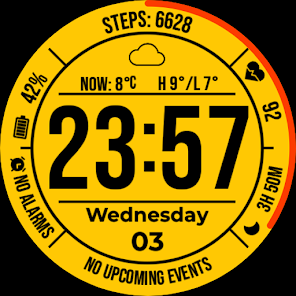
Time: Large, easy-to-read digital display. Supports 12/24h format (synced with phone settings).
Date: Full day of the week and date display.
Detailed Weather: Condition icon, current temperature, daily High/Low, and unit (C/F).
Fitness Tracking: Current Steps count and Heart Rate.
Battery Indicator: Clear digital percentage display.
Customization: Multiple color theme options and support for Custom Complications.
Always-On Display (AOD): Time, Date, and Weather data.
Privacy Policy
https://mikichblaz.blogspot.com/2024/07/privacy-policy.html
Please try the following quick fixes if you encounter these issues:
Weather Displays "Unknown": Solution: Switch to another watch face and then switch back to the current one.
Mixed/Incorrect Fonts: Solution: Restart your watch.
🌟 Key Watch Face Features 🌟
Time: Large, easy-to-read digital display. Supports 12/24h format (synced with phone settings).
Date: Full day of the week and date display.
Detailed Weather: Condition icon, current temperature, daily High/Low, and unit (C/F).
Fitness Tracking: Current Steps count and Heart Rate.
Battery Indicator: Clear digital percentage display.
Customization: Multiple color theme options and support for Custom Complications.
Always-On Display (AOD): Time, Date, and Weather data.
Privacy Policy
https://mikichblaz.blogspot.com/2024/07/privacy-policy.html
Updated on
Safety starts with understanding how developers collect and share your data. Data privacy and security practices may vary based on your use, region, and age. The developer provided this information and may update it over time.

No data shared with third parties
Learn more about how developers declare sharing

No data collected
Learn more about how developers declare collection
Ratings and reviews
4.3
61 reviews

Randy
- Flag inappropriate
February 3, 2026
I enjoy the look of the face, the only thing stopping from a 5 star is not being able to change the second hand color from red which is alittle distracting and also instead of a complete circle around the display maybe just a little tick that moves around.

Artur J
- Flag inappropriate
- Show review history
January 25, 2026
nice but with issues - top and bottom compilations are not properly displaying i.e. weather on bottom shows city onky, limited numer of options to pick from. developer explaied why this happening, looking forward to see improvements and more functionality i.e. detailed weather
MikichBlaz
January 25, 2026
Hello, the bottom complication is showing weather only because wear os defaults the long text to city only, for weather use the built in slot at the top or one of the other short text complications. Also if the weather is not displayed ok on the tip, switch to other watch face and apply this one again. For other issues: Miki.blazevski@gmail.com

Wikus Kruger
- Flag inappropriate
March 28, 2026
Nice face. Thank you for the great design. Good ok Battery. How do you get the red bar (on the bezel)? I can't figure it out?
MikichBlaz
March 28, 2026
Thank you for your support. To get the red seconds, go to customization menu of the watch face, and select the second one called "Seconds On/Off" if you have any trouble, contact me on miki.blazevski@gmail.com
Thanks 😊
What’s new
- Fixed: Heart Rate display bug on OnePlus/Pixel devices.
- Stability improvements.
- Stability improvements.
Rated for 3+
Learn moreApp support
About the developer
Milovan Blazhevski
miki.blazevski@gmail.com
Ul. Bul. Jane Sandanski Br. 30/1-7
Aerodrom
1000 Skopje
North Macedonia


